Most image models turn on-image words into gibberish. Ask for a poster with a title, a date and a price, and you get warped, half-invented letters. Meta Muse Image is different: it is an agentic image model that plans and reasons about the picture before it renders — and it can ground details with web search — so headlines, prices and dates come out spelled exactly as you asked. It is now in the Aura AI Agent.
In This Article
The proof: a poster with perfect text
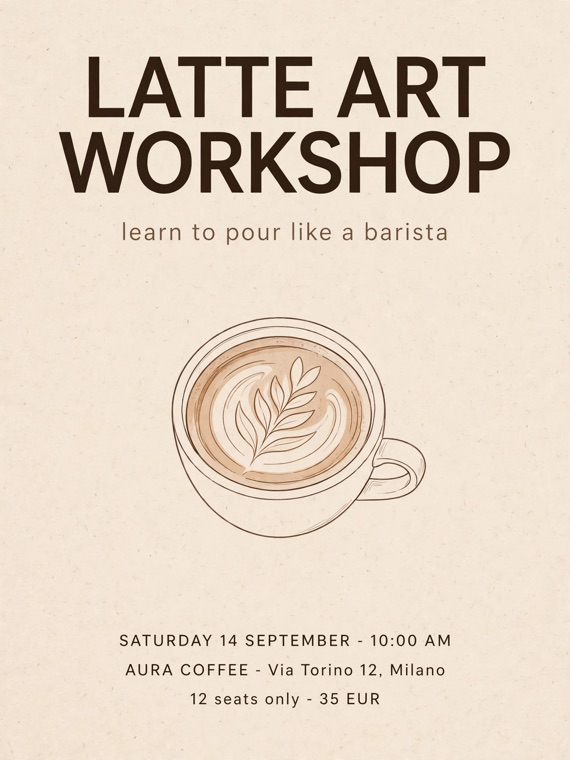
Here is a poster generated in one shot by Meta Muse Image. Read every line — the title, the subtitle, the date, the venue and address, the price. Nothing was retouched.
Why this is hard for most models
Typical diffusion models "paint" letters as shapes, so long or specific strings collapse into nonsense. Muse plans the layout first, then renders the text as text — which is why a five-line poster lands in a single generation instead of a dozen re-rolls.
In the chat: you just ask
In the Aura AI Agent there is no model picker to hunt through. You name Muse in your message and the agent uses it. Here is a real exchange — the user asks for the latte workshop poster "with Muse," the agent replies, and the result carries a small credit showing which model ran and what it cost.
Meta Muse Image · 2 credits
The model name shows up only afterward — as a small credit on the result. That "Meta Muse Image · 2 credits" is the whole receipt.
Why it's different
Three things set Muse apart from a typical snap-and-render image model.
It reasons before it renders
Muse plans the layout — where the title sits, how the details line up — before drawing a pixel. Complex briefs land in a single shot instead of five re-rolls.
It gets the words right
Headlines, labels, prices, dates: legible and correctly spelled, where other models smear letters into nonsense. This is where Muse earns its place.
Grounded and consistent
It can ground details with web search for real-world accuracy, and hold a style or composition steady across a set of images thanks to its anchored, planned layout.
Muse sits next to Nano Banana Pro and GPT Image 2 in the Aura AI text-to-image tool. The Meta Muse model page lists the three tiers (1, 2 and 4 credits) and the matching edit modes. If your brief is a photorealistic edit rather than a typography job, read our GPT Image 2 guide first.
How to use it in the Aura AI Agent
There is no model list to open and no settings to configure. You just ask.
-
Say what you want, with Muse.
For a fresh image, type something like generate a poster with Muse… For an edit, attach a photo and say edit this with Muse. Naming Muse is all it takes. -
Quote the exact words you want on the image.
Titles, dates, prices, addresses — put them in quotes or write them out plainly. Muse renders them faithfully. -
Send.
Muse plans, then delivers. It is a touch slower than a snap model because it is thinking first. Each image costs 2 credits.
What to reach for it for
Posters and flyers, product packaging mockups, social captions baked into the image, price tags and menu cards, event graphics — anything where the words on the picture have to be exactly right.
Try Meta Muse Image in the Aura AI Agent
No model menu, no setup. Open the agent, describe your poster, and name Muse in your message — then quote the exact text you want on the image.
Open the Aura AI AgentFrequently Asked Questions
What is Meta Muse Image?
Meta Muse Image is an agentic image model that plans and reasons about a picture before it renders it. Because it thinks first, it can lay out complex briefs — like a poster with a title, a date, an address and a price — and render every line of text spelled exactly as you asked.
Does it really render text correctly?
Yes. This is the whole point of the model. Where most image generators smear headlines and labels into gibberish, Muse keeps titles, prices and dates legible and correctly spelled. Quote the exact words you want in your prompt and it renders them faithfully.
How do I use it in Aura?
There is no model picker in the Aura AI Agent. You simply name Muse in your message — for example, generate a poster with Muse… or edit this with Muse on an attached photo — and the agent uses it. Quote the exact text you want on the image and send.
How much does it cost?
Meta Muse Image costs 2 credits per image in the Aura AI Agent. It is a touch slower than a snap model because it plans the composition before it renders.
Is this Google's Muse?
No. This is Meta's Muse Image, a recent agentic image model. It is not the same as Google's older Muse. If you have read about a model called Muse before and it was a Google research model, this is a different, newer thing.