Professional photo editing used to mean expensive software, steep learning curves, and hours of manual work. Not anymore. Aura AI's Image Editor — powered by the Wan 2.7 AI model — puts eight powerful editing features in your browser, no downloads required. Whether you need an AI face swap, AI background remover, or a way to colorize black and white photos, everything runs in seconds.
In This Article
Why Wan 2.7?
The Wan 2.7 AI model is one of the most capable open-weight vision-language models available today. It understands context, preserves fine detail like hair strands and skin texture, and produces photorealistic outputs that rival dedicated desktop editors. Aura AI runs Wan 2.7 on optimized cloud GPUs so you get results in seconds, not minutes.
1 AI Image Enhancement
Blurry photo? Low resolution? The AI image enhancer sharpens details, reduces noise, and upscales your image — all in a single pass. It is perfect for rescuing old phone photos, screenshots, or compressed images you need at print quality.

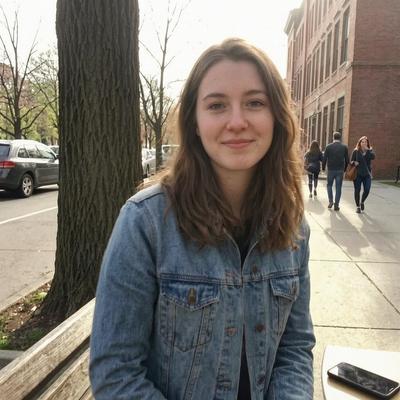
Wan 2.7 reconstructs missing detail intelligently rather than just sharpening edges, so faces stay natural and text stays legible.
2 AI Style Transfer
Turn any photograph into an oil painting, watercolor sketch, anime illustration, or cyberpunk poster. AI style transfer re-renders your image while preserving composition and identity. Choose from built-in presets or describe any artistic style in plain English.


Popular styles include Studio Ghibli, Van Gogh, pixel art, and vintage film. Because the Wan 2.7 model understands semantics, it applies the style to the right parts of the image — skin tones stay plausible even in a cartoon rendering.
3 AI Background Removal
Need a transparent PNG for your store, presentation, or social post? The AI background remover isolates your subject with pixel-perfect precision — even around flyaway hairs, translucent fabrics, and complex edges that trip up traditional tools.


Once the background is removed, you can replace it with a solid color, a gradient, or any scene you describe in the prompt. E-commerce sellers love this for creating consistent, white-background product shots in seconds.
4 AI Colorize Black & White Photos
Bring family archives and historical images to life. The AI analyzes context clues — sky, skin tone, foliage, clothing patterns — to colorize black and white photos with stunning accuracy. Results feel authentic, not tinted.


Wan 2.7 was trained on millions of paired color and grayscale images, giving it an intuitive understanding of what colors belong where. You can also nudge the palette with prompts like "warm sunset tones" or "cool desaturated cinema look."
5 AI Object Removal
Photobombers, power lines, watermarks, stray trash — whatever is ruining your shot, the AI object removal tool erases it and fills in the gap with context-aware detail. Just brush over the area or describe what to remove.
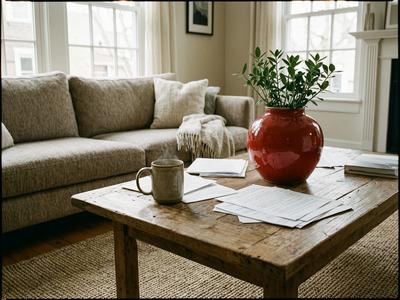

Unlike simple clone-stamp approaches, the Wan 2.7 model understands scene geometry and lighting, so the repaired area blends seamlessly.
6 AI Face Swap
Swap faces between two photos with a single click. The AI face swap feature maps facial geometry, matches skin tone and lighting, and blends the result so naturally it looks like the person was actually there.


Great for creative projects, group photo fixes, and social content. The model preserves expression nuances and adapts to different head angles automatically.
7 AI Age Progression
What will you look like in 30 years? What did you look like as a child? The AI age filter applies realistic aging or de-aging to any portrait. It adjusts wrinkles, skin texture, hair color, and facial structure while keeping your identity intact.


The age progression tool is wildly popular on social media. Create "then vs. now" content, surprise family members, or just satisfy your curiosity — the results are consistently photorealistic.
8 AI Outfit Change
Virtual try-on without stepping into a fitting room. The AI outfit changer replaces clothing in your photo with anything you describe — a formal suit, a summer dress, streetwear, cosplay gear. It respects your body proportions and the scene's lighting.


Fashion influencers use this to preview looks before purchasing, and e-commerce brands use it to show clothing on diverse models without additional photoshoots.
How It Works
Using Aura AI's Image Editor is as simple as three steps:
-
Upload Your Photo
Drag and drop an image, paste from clipboard, or select one from your Aura AI gallery. JPG, PNG, and WebP are all supported. -
Choose a Feature or Describe Your Edit
Pick one of the eight features above, or type a freeform prompt like "remove the person on the left and make it look like a watercolor." The Wan 2.7 model understands natural language instructions. -
Download or Animate
Your edited image is ready in seconds. Save it directly, or send it straight into Aura AI's video generator to animate it with Veo 3, Luma, or Kling.
Edit, Then Animate
The real power of Aura AI is combining the Image Editor with video generation. Remove a background, swap in a fantasy scene, then animate the result into a cinematic clip — all without leaving the platform. This is the best AI image editing tool for creators who also make video content.
Try the Best AI Photo Editor of 2026
All eight features are available right now inside Aura AI. No downloads, no credit card required to start. Upload a photo and see what the Wan 2.7 model can do.
Whether you need an AI image editor online for quick social media posts, a precise AI background remover for your Shopify store, or a fun AI face swap for a group chat — Aura AI has you covered.
Open the Aura AI Image Editor
Face swap, style transfer, background removal, colorization, object removal, age filter, outfit change, and image enhancement — all powered by Wan 2.7.
Open Image Editor