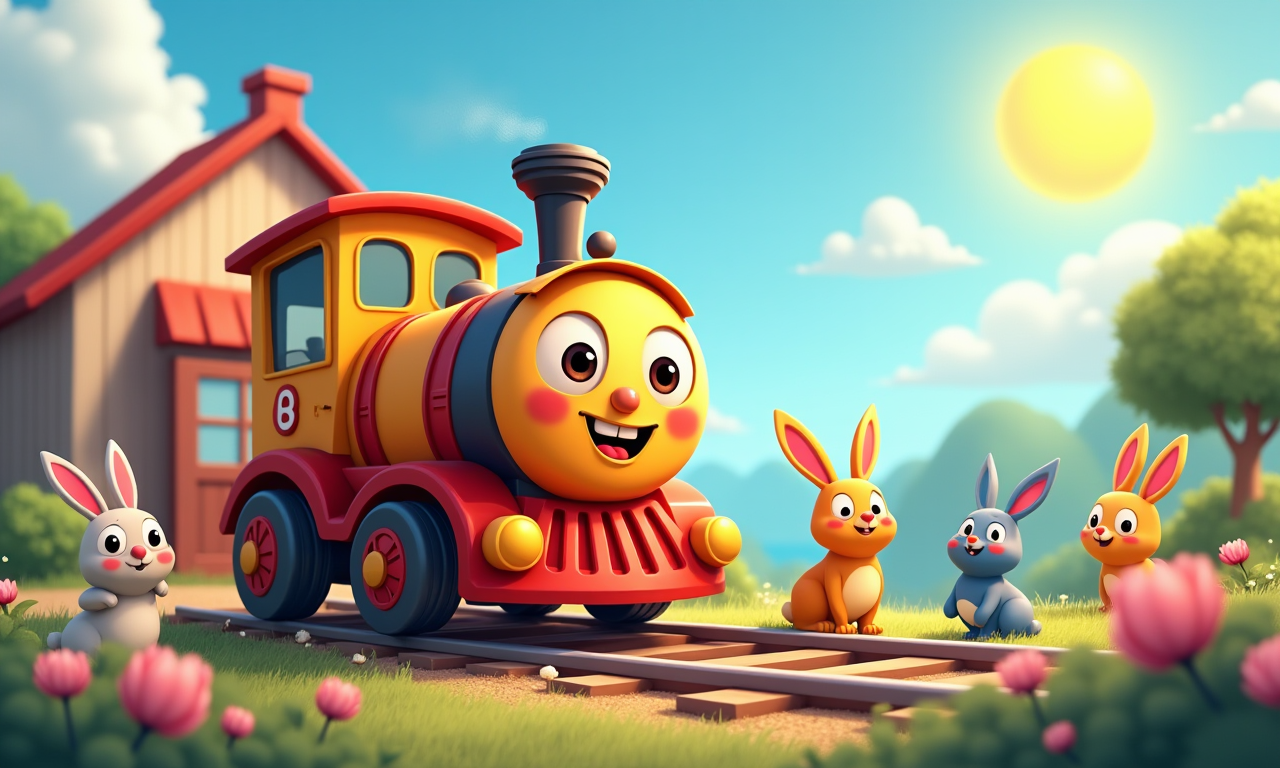
You can make an AI cartoon video in two ways on Aura AI: describe the scene in text to video, or upload a drawing or a generated illustration and animate it with image to video. Both routes give you 2D-style clips with native audio in a few minutes. Below is how each one works, prompt examples you can paste in, and the story of Tino the Train, the first cartoon we produced this way in 2024 for children aged 2 to 6.
Two Ways to Make a Cartoon Video with AI
From a text prompt
Write the scene like a storyboard note: characters, setting, action, camera and style. Kling 3.0 renders 3 to 15 second clips with native audio and lip sync, which suits dialogue between characters. Seedance 2.5 handles 4 to 15 second multi-shot sequences, so one prompt can cover a wide shot, a close-up and a reaction. Both accept 16:9 for YouTube and 9:16 for Shorts.
From a drawing or illustration
If you already have a character design, a scan of a child's drawing, or a still generated in text to image, upload it to image to video and describe only the motion. The model keeps your line work and colours and animates the scene around them. For a series with the same characters in every episode, reference to video takes 2 to 5 images of the character and holds the look across clips. Our reference to video guide shows the workflow step by step.
Cartoon Prompt Examples
- "2D cartoon, a small blue train with big friendly eyes puffs out of a sunny station, rabbits and birds wave goodbye, bright flat colours, gentle piano, 16:9, 8 seconds"
- "Storybook style, a fox in a yellow raincoat walks through a rainy forest, puddles splash, soft rain sounds, camera follows from the side, 16:9, 10 seconds"
- "Shot 1: a little robot looks up at a night sky full of shooting stars. Shot 2: close-up of its glowing eyes. Shot 3: it smiles. Warm lullaby music, 9:16, 12 seconds"
For anime-style characters instead of Western cartoon looks, the AI anime prompt list has 25 prompts and image-to-anime examples.
Case Study: Tino the Train's Adventure
Our journey began with a simple yet ambitious idea: to create a charming, wordless cartoon that communicates emotions and stories through visuals alone. The protagonist of our story is Tino the Train, a delightful little locomotive who embarks on a heartfelt journey through various landscapes, each representing different emotions.
Step 1: Crafting the Story and Characters
We started by brainstorming a story that not only entertains but also imparts a meaningful message. The narrative follows Tino as he experiences joy, sadness, wonder, and tranquility, teaching young viewers about the richness of emotions.
Step 2: Generating Images with AuraAI.app
Using auraai.app, we generated detailed images for each scene. By inputting descriptive prompts, we guided the AI to produce vibrant, 2D cartoon-style illustrations. For instance:
"A cute, colorful little train named Tino is at a small, charming station, illustrated in a vibrant 2D cartoon style. He has expressive, oversized eyes and a big smile. Friendly cartoon animals like rabbits and birds wave goodbye. The sun is shining in a clear blue sky with whimsical flowers blooming along the tracks."
Step 3: Animating the Scenes
With the images ready, we used the image to video tool on Aura AI to bring Tino's world to life. In 2024 each scene was a 5-second clip; with Kling 3.0 or Seedance 2.5 the same prompt now returns 10 to 15 seconds with native sound, so a ten-scene story needs far fewer generations.
Step 4: Assembling the Video
We carefully arranged the animated scenes to craft a cohesive story:
- Departure: Tino leaves the station, waving goodbye to his friends.
- Changing Skies: Clouds gather, and the sun hides, setting a new mood.
- Rainy Forest: Tino travels through a serene, rain-soaked forest.
- Rainbow's Promise: A rainbow appears as the rain clears.
- Starry Night: Tino marvels at shooting stars in the night sky.
- Peaceful Dawn: The sunrise brings calm and a new beginning.
- Lakeside Rest: Tino relaxes by a tranquil lake.
- Birds in Flight: Colorful birds soar, symbolizing freedom and joy.
- Homecoming: Tino returns to the station, welcomed warmly.
- Serene Sunset: The day concludes with a beautiful sunset.
Step 5: Adding the Finishing Touches
To enhance the emotional resonance, we selected background music that reflects the mood of each scene. Since the cartoon is wordless, music plays a crucial role in guiding the audience's feelings and engagement.
Why This Project Is a Game-Changer
This endeavor marks a significant milestone in animation and AI technology:
- Accessibility: AuraAI.app allows creators without extensive animation skills to produce high-quality cartoons.
- Innovation: It demonstrates the potential of AI in creative industries, opening doors for new forms of storytelling.
- Education: The cartoon serves as a tool for children to understand and navigate their emotions.
Experience Tino's Journey
We invite you to watch the full video on our YouTube channel:
Watch "Tino the Little Train's Magical Journey" on YouTube 🚂✨
Don't forget to like, comment, and subscribe for more AI-animated adventures!
About AuraAI.app
AuraAI.app is a cutting-edge platform that leverages artificial intelligence to generate images and animate videos based on user prompts. It's a valuable tool for artists, educators, and creators looking to bring their ideas to life without the need for advanced technical skills.
Join the Conversation
We are excited about the possibilities this technology brings and would love to hear your thoughts:
- Have you tried using AI for creative projects?
- What emotions did Tino's journey evoke for you or your children?
Share your experiences, and let's explore the future of AI in animation together!
This blog post was created to celebrate the innovative use of AI in animation, demonstrating how technology and imagination can come together to create something truly special.
Make your own cartoon video
Type a scene or upload a drawing, pick Kling 3.0 or Seedance 2.5, and download a 2D-style clip with native audio, no watermark.
Open Text to Video