Game-ready 3D characters

AI 3D character generator for Unreal Engine

Describe a character and the Aura agent builds the 3D model, then rigs it: skeleton, skin weights, walk and run animations. Download the FBX and drop it into Unreal Engine 5, Unity or Blender.

Text or photo to 3D, then one sentence to rig it. Included from the Pro plan.

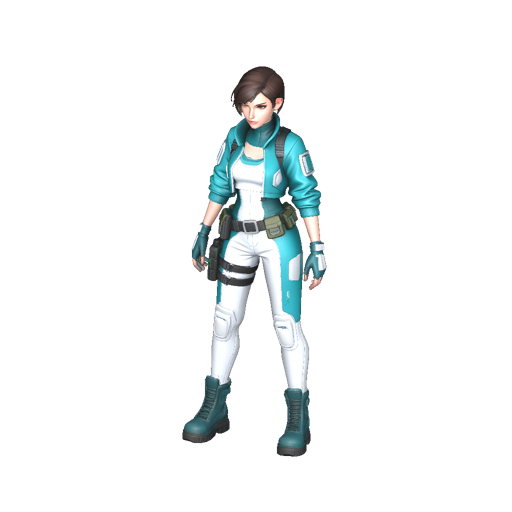
A sci-fi explorer character generated and rigged by the Aura agent Loading 3D model… Rigged in one message · walk cycle · "a sci-fi explorer"

From a sentence to a Skeletal Mesh

A static 3D model is a statue. A game character needs bones, skin weights and animation clips, and that is usually a day of manual rigging. The agent does it for you, on the character it just generated, in about two minutes.

It is honest about scope: Aura makes the assets. Your game logic, Blueprints and C++ stay in your engine, where they belong.

I'm making a tactical shooter in Unreal 5. I need a soldier character I can animate.
Creating a full-body soldier in a neutral A-pose, ready for rigging. About 2 minutes.
Done. Want me to rig it for Unreal? You'll get the FBX with skeleton plus walk and run animations.
Yes, rig it
Rigged. Import the "FBX rigged" file as a Skeletal Mesh, then the walk and run FBX as animations on the same skeleton.

How it works

Three messages, no modelling software.

1

Describe the character

"A medieval knight", "a cyberpunk courier", or attach concept art. The agent asks for a full body in A-pose, the pose rigging likes best.

2

Ask to rig it

The agent fits a humanoid skeleton, binds the mesh and adds walking and running clips. The viewer plays the walk so you can check it.

3

Import into your engine

Download the rigged FBX and the animation files from Other formats and import them into Unreal Engine 5, Unity or Blender.

Import guides

The exact steps for the three most used tools.

Unreal Engine 5

  1. Content Browser, Import, choose the rigged FBX.
  2. Keep Skeletal Mesh checked, enable Import Animations.
  3. Import the walk and run FBX and pick the character's skeleton.

Unity

  1. Drag the FBX into Assets.
  2. In the Rig tab set Animation Type to Humanoid, Apply.
  3. Use the walk and run clips in an Animator Controller.

Blender

  1. File, Import, FBX or glTF.
  2. The armature and the action come in with the mesh.
  3. Retarget or tweak, then export wherever you need.

What you download

Rigged character

FBX and GLB with a humanoid skeleton and skin weights, textured with PBR materials.

FBX riggedGLB rigged

Animation clips

A walk cycle and a run cycle on the same skeleton, as FBX for engines and GLB for the web.

Walk FBXRun FBXGLB

Props and environments

Weapons, crates, furniture and buildings don't need bones: they come as GLB, OBJ or FBX and import as static meshes.

The rest of the pipeline, in the same chat

Concept art for your characters and maps, textures, key art and trailers with Veo, Kling or Seedance. One agent that remembers your project's style and your preferred formats.

3D AI agent · Text to image · Text to video · All AI models

Frequently asked questions

Can I use AI generated characters in Unreal Engine 5?

Yes. Ask the agent for a full-body character, then ask it to rig the character. You get an FBX with skeleton and skin weights that Unreal Engine 5 imports as a Skeletal Mesh, plus walking and running animations on the same skeleton.

How do I import the rigged FBX into Unreal Engine?

In the Content Browser choose Import, select the rigged FBX, keep Skeletal Mesh checked and enable Import Animations. Import the walk and run FBX files the same way and assign them to the skeleton that Unreal created for the character.

Does it work with Unity and Blender too?

Yes. In Unity drop the FBX into Assets and set Animation Type to Humanoid in the Rig tab. In Blender use File, Import, FBX or glTF. The GLB version works in three.js, Godot and any glTF viewer.

Which characters can be rigged?

Humanoid characters standing upright, with a head, two arms and two legs. A neutral A-pose with the arms slightly away from the body gives the cleanest skin weights. Animals, vehicles and props are not rigged: they import as static meshes.

Can the agent build my game or write Blueprints?

No. Aura creates game assets: concept art, 3D models, rigged and animated characters, textures and trailers. Building the game, Blueprints and C++ stay in your engine.

How much does a rigged character cost?

From 4 credits for the 3D model and 3 credits for the rig with walk and run animations. 3D generation and rigging are included from the Pro plan.
Make your first game character

Open the agent on the web or in the Aura AI app and describe who should walk through your level.

Aura agent on the web · Android app · iPhone and iPad app