Running a Shopify store means one thing above all: your product images sell for you. Customers can't touch, hold or try your products, so every photo, every angle, every lifestyle shot has to do the convincing. The problem? Professional product photography is expensive, time-consuming, and hard to scale. That changes today.
Aura AI Studio is now available on the Shopify App Store — bringing the full power of AI-generated product content directly inside your Shopify admin. No external tools, no photoshoots, no design skills required. Select a product from your catalog, choose what you want to create, and the AI does the rest.
2026 update: Since launch, the Shopify app has been joined by AIGC Studio on auraai.app, which turns a product link or a short brief into a complete UGC-style video ad with avatar, script, voiceover and product shots. For an independent look at how the app stacks up against Photoroom, Flair AI, Pebblely and CreatorKit, read our AI product photography app comparison.
What Is Aura AI Studio for Shopify?
Aura AI Studio is a Shopify embedded app that transforms your existing product photos into professional-grade marketing content using advanced AI models. It works with the images you already have in your store — no need to upload anything externally. Just pick a product, select a creative tool, and generate.
The app lives directly inside your Shopify admin panel, so you never have to leave your store's dashboard. Every image you generate can be saved back to the product with one click.
7 Creative Tools Built for E-commerce
Aura AI Studio comes packed with seven specialized tools, each designed to solve a real problem Shopify merchants face every day:
1. Product Contexts
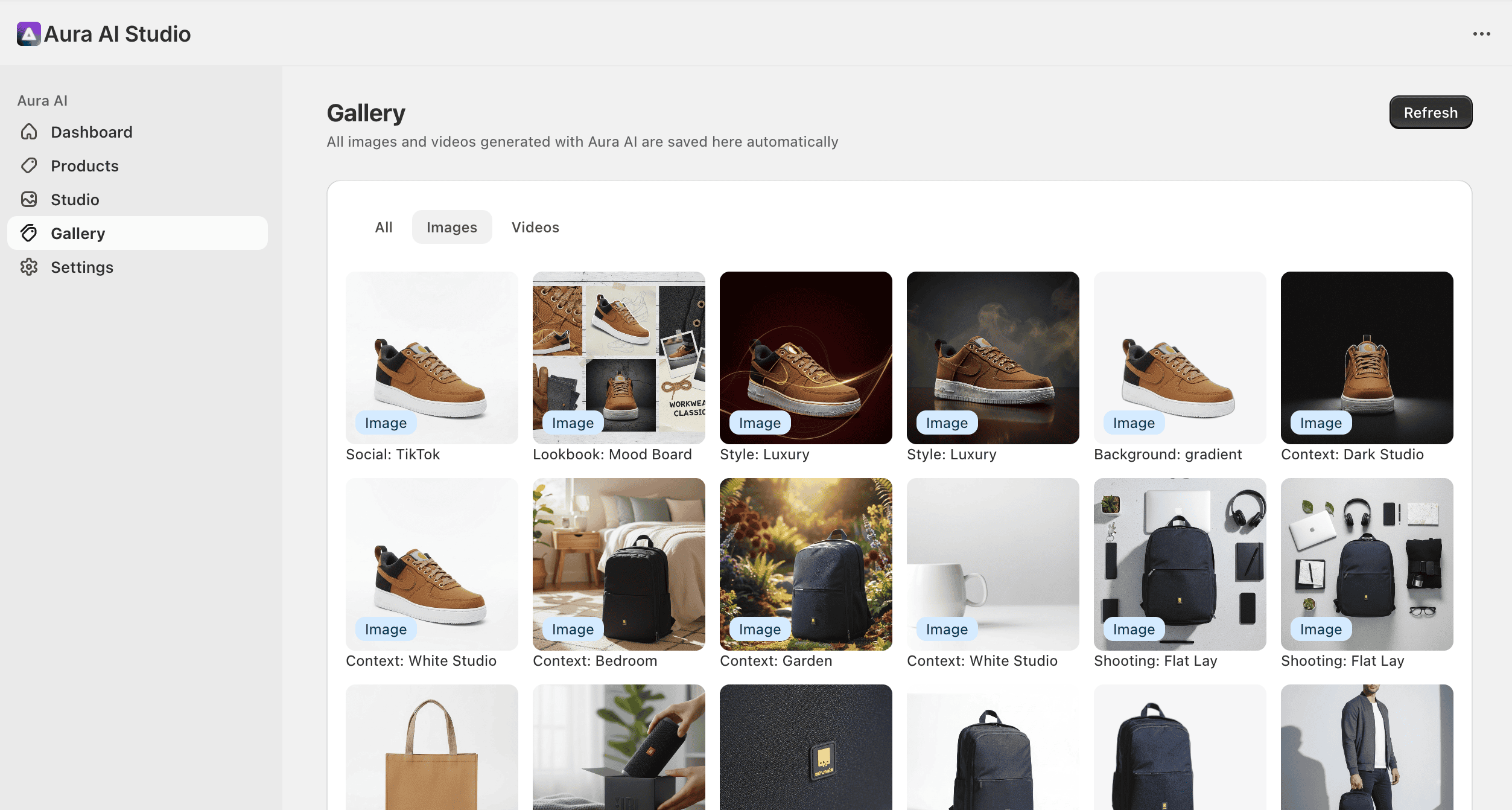
Place your products in realistic lifestyle settings without a physical photoshoot. Kitchen countertop, outdoor patio, office desk, gym bag, Christmas scene — select a context and the AI composites your product into a believable environment. This is the kind of content that drives engagement on social media and makes product listings feel premium.
Instead of hiring a photographer to shoot your coffee mug in a cozy kitchen, the AI generates it in seconds. The result? Lifestyle-quality images at a fraction of the cost, ready to publish to your product page or social accounts.
2. AI Photo Shoot
Generate professional product photography styles that would normally require a studio: flat lay compositions, model-worn shots, macro detail close-ups, group arrangements, unboxing setups, and more. Each style is designed around proven e-commerce photography conventions that shoppers expect from professional stores.
This is particularly valuable for merchants who sell apparel, accessories, cosmetics, or food — categories where presentation directly affects conversion rates.
3. 3D Product Rotation
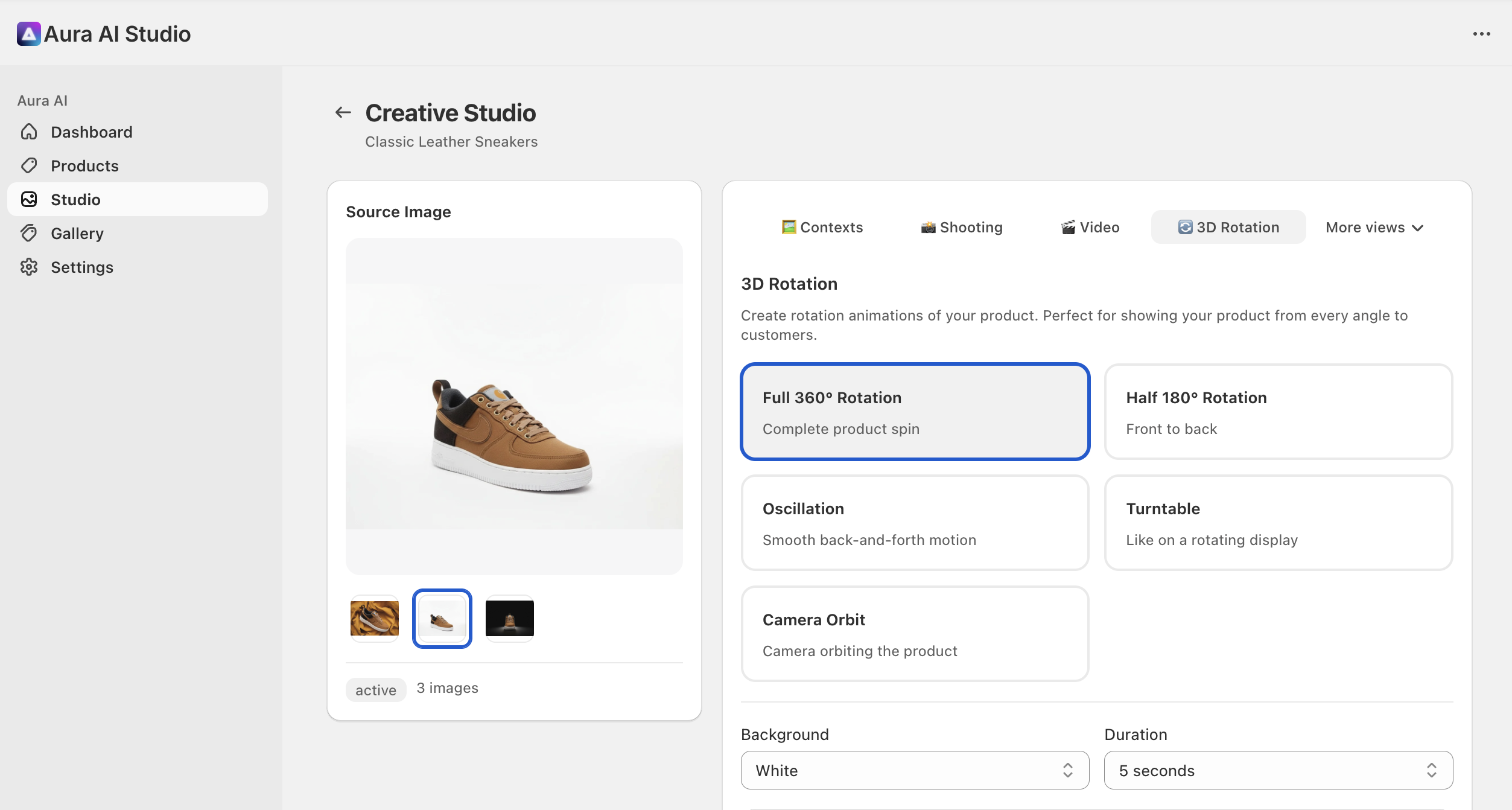
Turn a single product photo into a 360-degree rotation video. Customers can see your product from every angle, which studies show can boost conversion rates by up to 40%. The AI intelligently reconstructs perspectives not visible in the original image to create smooth, convincing rotation animations.
AI-generated 3D product rotation from a single photo
Choose from multiple rotation styles — full 360° spin, half rotation, turntable, oscillation, and camera orbit. The app also processes your product's background automatically: remove it, replace it with white, black, or gradient — then apply the rotation effect for a clean, professional result.
If you want to learn more about why 360° rotations matter for e-commerce, read our in-depth guide: 360° Product Rotation Videos: The E-commerce Tool That Boosts Conversions by 40%.
4. Background Magic
Remove, replace, or expand your product photo backgrounds with a single click. This alone can save hours of Photoshop work per week. Options include:
- Remove Background — Instantly get a clean transparent or white background
- Replace Background — Swap in a new scene or solid color
- Expand (Outpaint) — Extend the borders of your image to fit different aspect ratios without cropping your product
- Blur Background — Create professional bokeh effects that make your product pop
For Shopify merchants, clean product backgrounds are a requirement for a professional-looking store. This tool eliminates the need for manual editing entirely.
5. Artistic Styles
Transform your product photos into stylized variants: minimalist, luxury, vintage, pop art, neon, watercolor, and more. These are perfect for seasonal campaigns, brand-specific aesthetics, or standing out in crowded markets. Apply a consistent artistic style across your entire catalog to create a cohesive brand identity.
6. Social Ready
Generate images optimized for specific social media platforms: Instagram posts, Instagram Stories, TikTok, Facebook, Pinterest. Each format is sized and styled according to platform best practices, with appropriate aspect ratios, compositions, and visual treatments. Stop manually resizing and reformatting — get platform-ready content in one click.
7. Lookbook
Combine multiple products into editorial-style compositions and catalog layouts. This is ideal for fashion stores, home decor, beauty brands, and anyone who wants to showcase product collections together. The AI arranges your selected products into visually appealing compositions that feel like they came from a professional catalog shoot.
How It Works
The workflow is designed to be as simple as possible:
- Choose a product from your Shopify catalog — all your products are automatically synced
- Select a source image from the product's existing photos
- Pick a creative tool and configure your options (scene type, style, format, etc.)
- Click Generate — the AI processes your request and delivers the result
- Save to product — add the generated content directly to your product's media with one click
Every generated image and video is automatically saved to your Gallery within the app, so you can always go back and download or reuse previous generations.
Built for Shopify Merchants
Unlike generic AI image tools, Aura AI Studio is purpose-built for e-commerce:
- Native Shopify integration — works inside your admin, reads your product catalog, saves directly to products
- No learning curve — the interface follows Shopify's design patterns (Polaris), so it feels familiar from day one
- Credit-based pricing — pay only for what you generate, starting from a $0 tier
- Secure — your data stays within the Shopify ecosystem, with OAuth authentication and encrypted connections
Why AI Product Photography Matters in 2026
The numbers speak for themselves. Products with high-quality, varied imagery see significantly higher conversion rates. Lifestyle images drive social engagement. 360° rotations reduce return rates. And yet, most Shopify merchants still rely on a handful of static photos taken once, often with a smartphone.
The gap between what top-performing stores show and what most stores can afford to produce has been enormous — until now. AI-generated product content levels the playing field, giving independent merchants and small brands access to the same quality of visual content that enterprise retailers invest tens of thousands in.
For broader insights on how AI is reshaping content creation, see our article on How AI Is Transforming Video Marketing: Trends and Winning Strategies.
Pricing
Aura AI Studio for Shopify offers two plans:
- $0 tier — 10 image credits + 3 video credits per month. Enough to test the app and generate your first content.
- Pro ($9.99/mo — 50% Launch Offer) — 200 image credits + 30 video credits per month. All AI models included. Cancel anytime through Shopify billing. Originally $19.99/mo.
Payment is handled entirely through Shopify's secure billing system. No external accounts or payment methods needed.
Get Started
Aura AI Studio is available now on the Shopify App Store. Install it, select a product, and generate your first AI-powered content in under a minute.
If you're already using Aura AI on mobile or desktop for video generation, the Shopify app brings the same AI technology to your store — optimized specifically for product photography and e-commerce content workflows.
Install Aura AI Studio on the Shopify App Store →
Have questions? Contact us or reach out through the app's support channel directly from your Shopify admin.
Related: our comparison of AI product photography apps for Shopify, AIGC Studio for video ads, and the image models behind the product shots, Nano Banana Pro (3 credits per image, strong on packaging text) and GPT Image 2.5 (4 credits, Sunburst for detailed product renders).
Try Aura AI Today
AI-powered product photography and content generation for your Shopify store. Credits per generation, no photoshoot.
Install on Shopify